7 app onboarding techniques that turn installs into engaged users
Follow us on social media
to stay up to date


Contents
- What is app onboarding?
- Mobile user engagement by the numbers
- 7 effective app onboarding techniques
- 1. Benefit at the core
- 2. Personalization
- 3. Make the first success easy
- 4. User guides and in-app instructions
- 5. Streamline sign-up
- 6. Push notifications
- 7. Email sequences
- Onboarding isn’t everything,but it’s where everything starts

What is app onboarding?
Mobile app user onboarding is more than just a tutorial. It's your first real chance to roll out the red carpet and show users why they'll love your app.
Imagine inviting friends over for dinner. You wouldn't greet them with a presentation about your silverware, would you? You'd show them where everything is, make them comfortable, and get them enjoying themselves fast.
That's what great app onboarding does:
- Gets users oriented without awkward fumbling
- Makes them feel smart, not frustrated
- Gives them that "aha!” moment fast
Because here's the ugly truth: most people decide within 30 seconds whether your app stays or gets dumped. They're not judging your features list.
They're asking:
"Does this feel intuitive?"
"Do I get what this does?"
"Is this worth my time?"
Deal with this part right, and you don't just get installs — you get actual users who keep coming back. Miss the mark, and you're just another icon collecting dust on their home screen
Mobile user engagement by the numbers
Let’s look at what the data says.
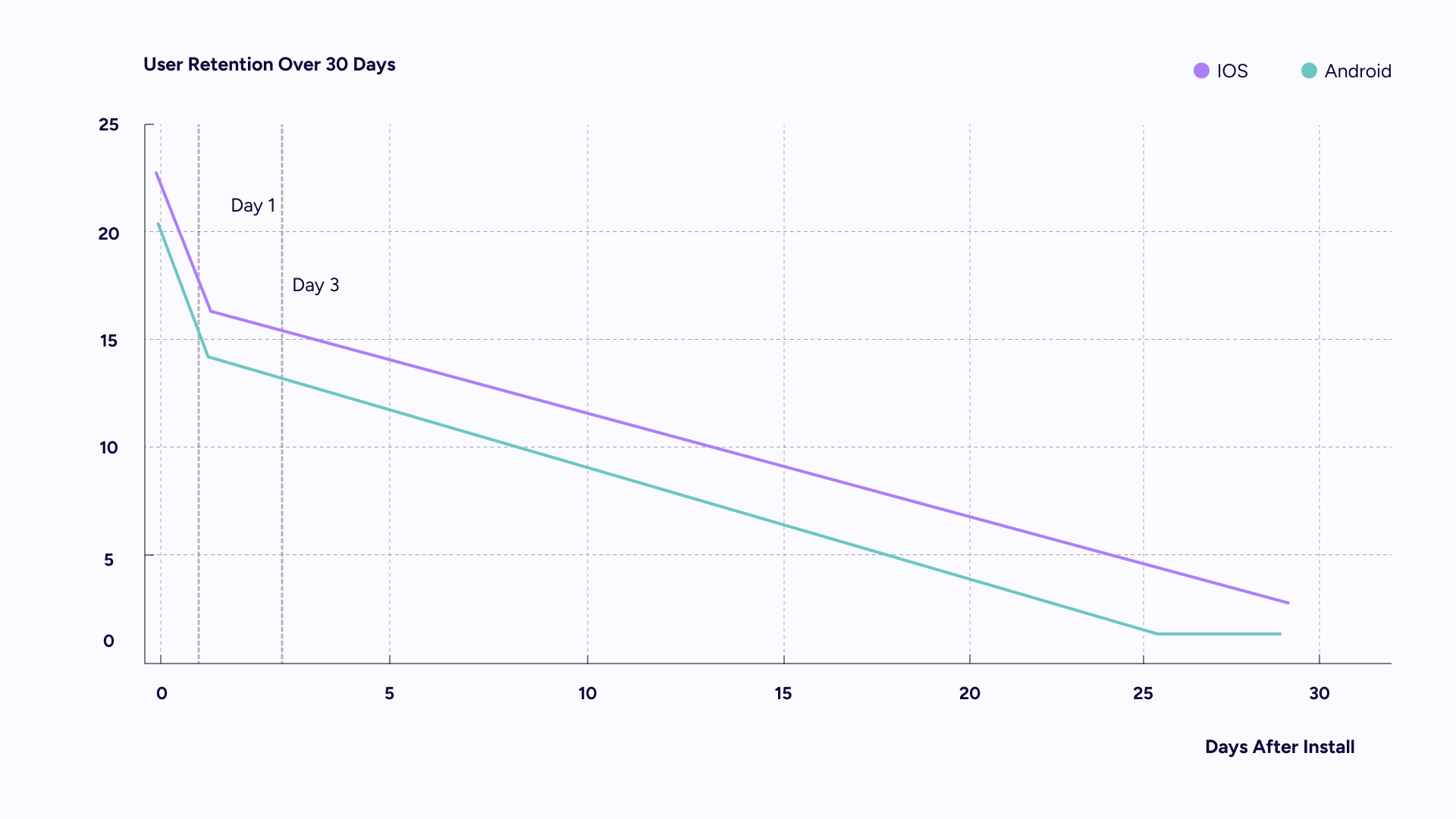
According to a December 2024 benchmark report from UXCam, drawing on data from Business of Apps, mobile apps typically lose about 77% of their daily users within just three days of install.
Long-term retention is even more challenging: by day 30, retention drops to just 2.1% on Android and 3.7% on iOS, according to the latest Business of Apps retention benchmarks.
Diving deeper, UXCam’s study breaks this down by verticals: news apps retain about 11.3%, whereas gaming apps are at just 2.4% by day 30.
The data makes one thing clear: you've got about 72 hours before most users ghost your app forever. It's like dating: if you don't make a great first impression, there won't be a second date.
Those first few sessions? That's your one shot to show them why they can't live without you.
A smooth, well-timed onboarding experience can be the difference between someone leaving your app... or making it part of their daily routine
7 effective app onboarding techniques
Simple: design an app user onboarding experience that shows your app's value immediately. Do this well, and watch mobile app user engagement quadruple.
Here’s something to consider.
1. Benefit at the core
Showcase what your app does best. Don’t overwhelm users with a list of features — highlight a few key benefits that make your app stand out.
Ideally, this should happen right after the app is opened, either before sign-up or right after account creation. The earlier users see the value, the better.
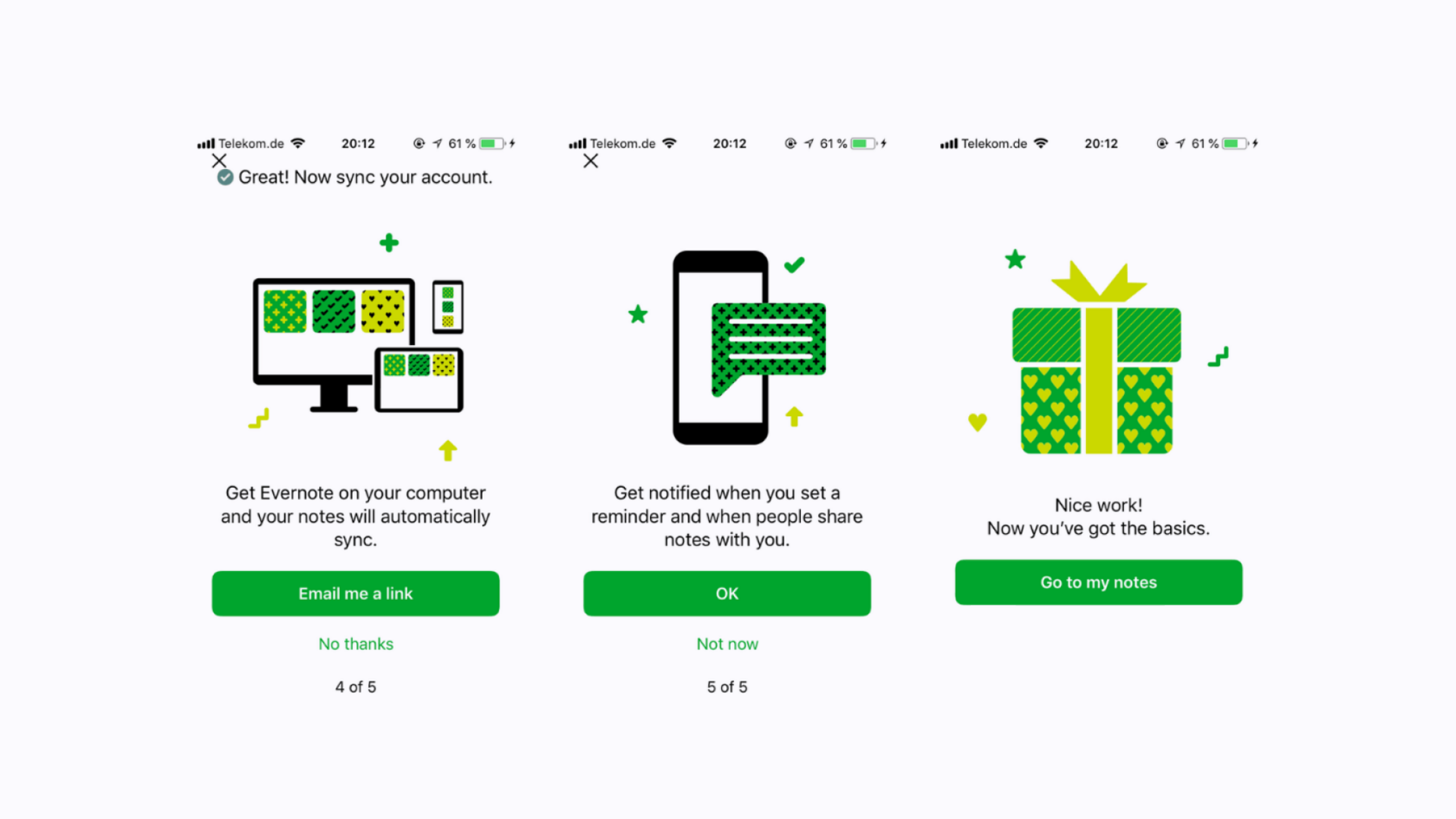
Look at Evernote. The app introduces three core benefits before prompting users to create an account, followed by a short app tour. This helps users understand the app’s purpose and unique value from the start.
Remember to always communicate the real value. Overpromising and overselling will just lead to quick uninstalls.
2. Personalization
We live in the age of ultimate personalization. People are used to Netflix knowing what they want to watch and Spotify serving up the right playlist without asking. Expectations are high, and apps that don’t adapt quickly feel outdated.
We recommend two options:
- Create a single, universal onboarding flow (which saves money)
- Or build tailored onboarding tracks based on user personas
The second approach tends to boost engagement, as it’s more relevant and focused.
Canva does this well: early in the experience, it asks what the user is here for. If they select “Small Business,” they’re shown specific templates for banners, social media posts, and more.
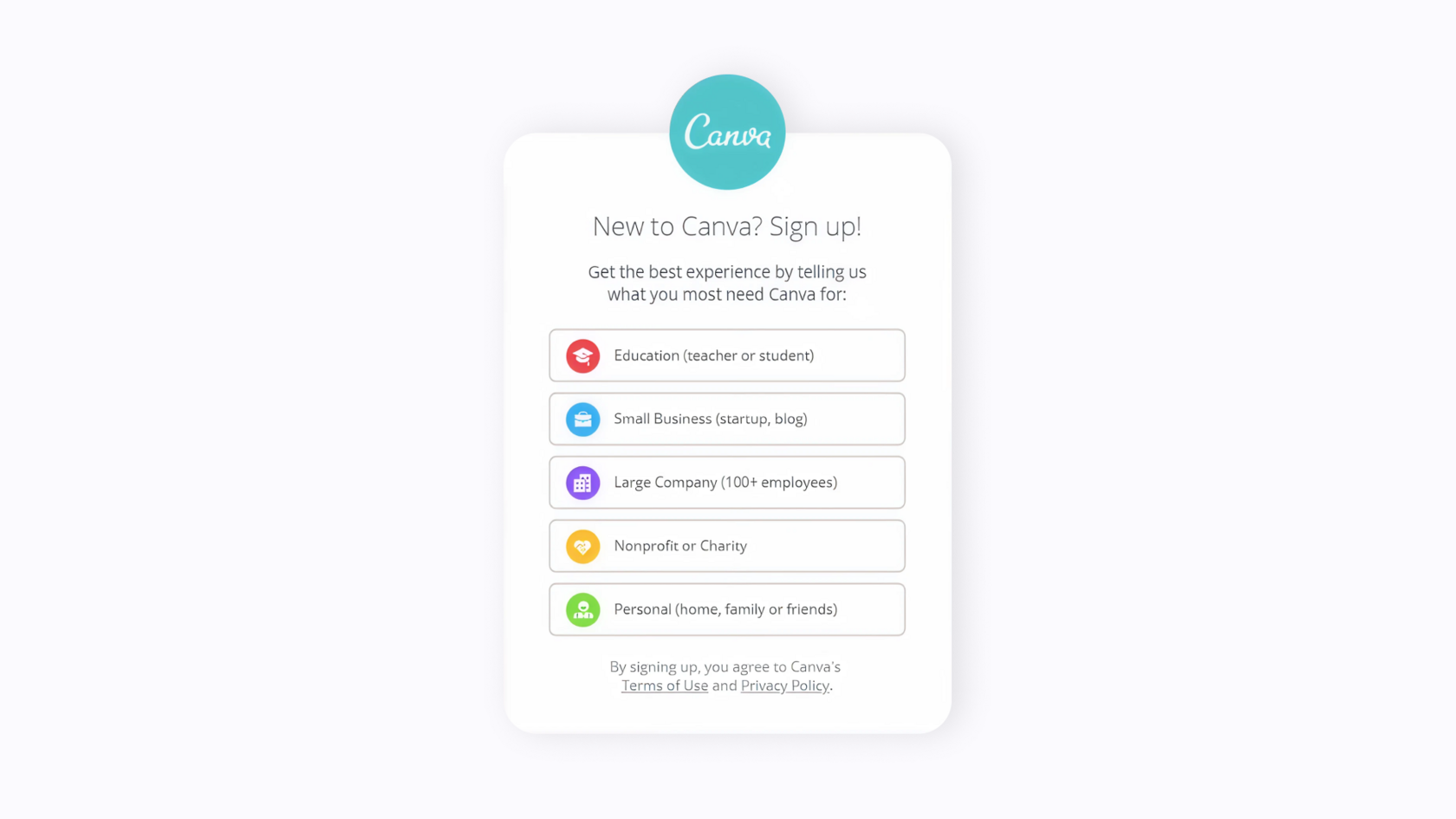
This kind of targeted onboarding helps users quickly visualize their first success, and that moment often determines whether they stay or churn.
3. Make the first success easy
Every app download starts with a need to accomplish something, discover information, or simply have fun. Your mobile app user onboarding should bridge that gap immediately.
When users taste success completing their first task, creating content, or winning—that's when real engagement begins. But make them work too hard for that first win, and you'll lose them for good.
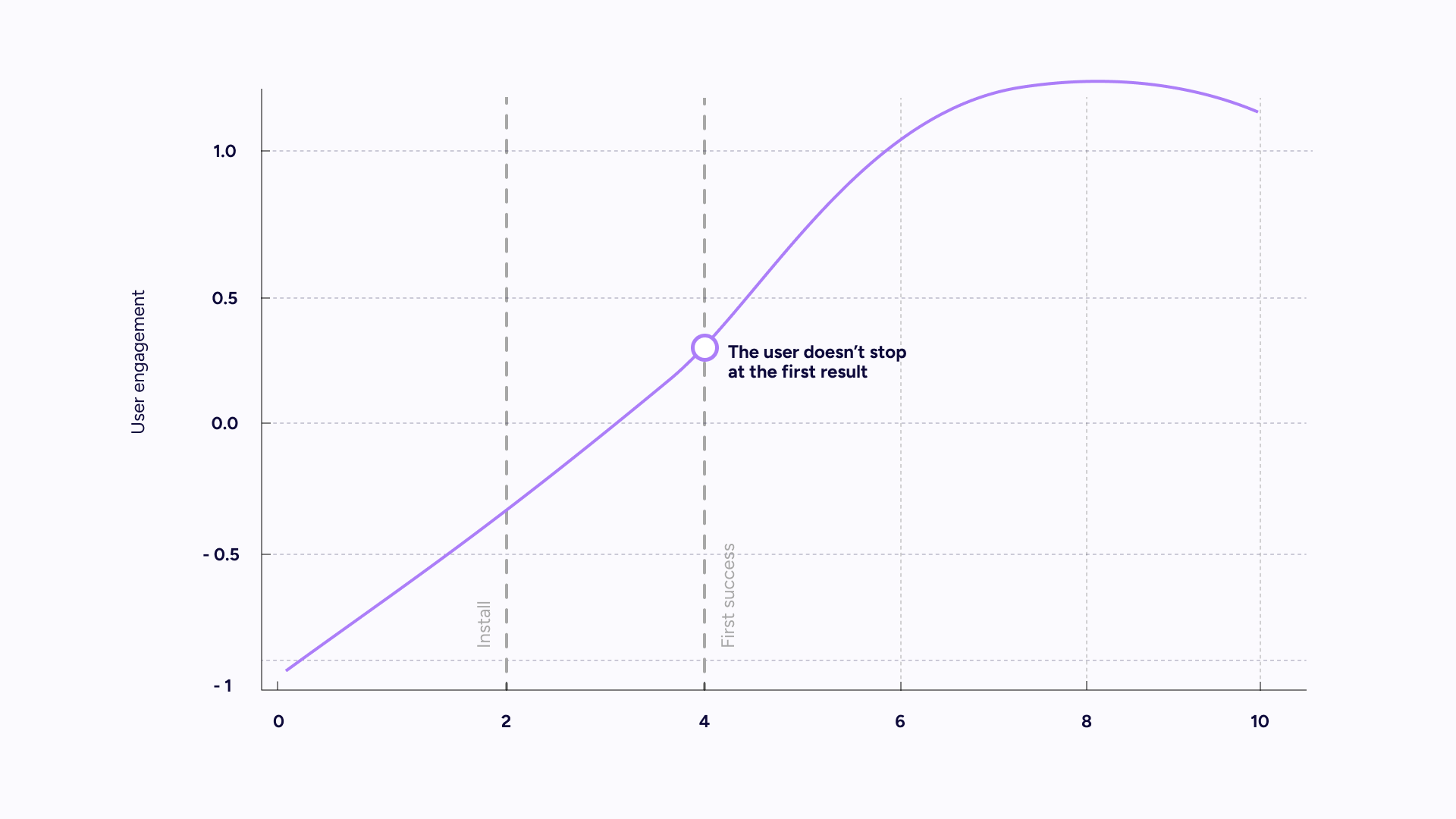
Your onboarding should be designed so that “first success” happens fast.
Take Clash Royale: new users are dropped straight into training battles.
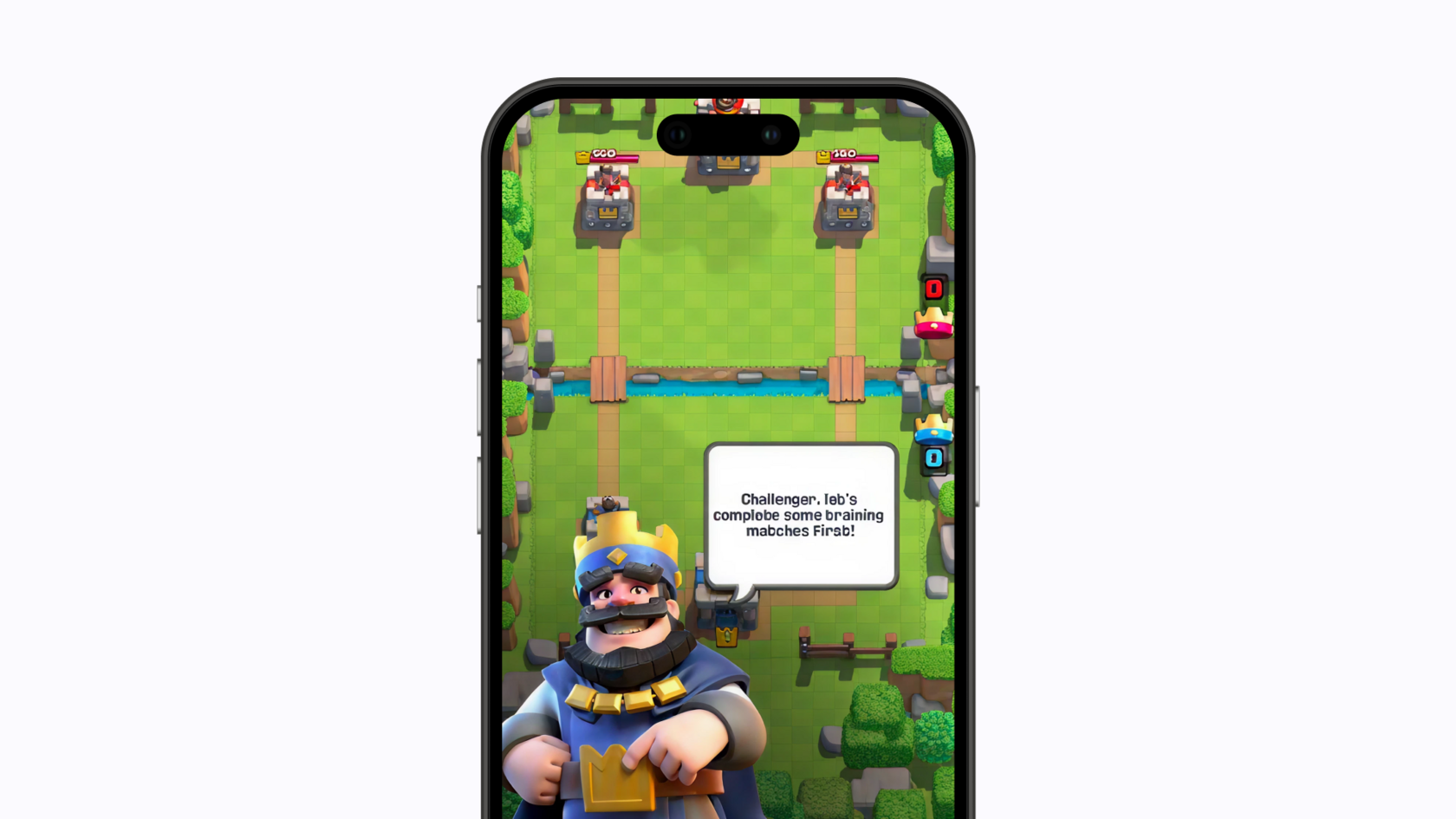
They win a few matches right away—giving them instant gratification and a reason to keep going. The faster users reach their first success, the better your retention will be.
4. User guides and in-app instructions
A top reason users leave? They don’t understand how your app works.
That’s why instruction-based onboarding matters, especially for apps with a learning curve.
Mailbox is a great example: it offers an eight-step walkthrough to explain the essentials without overwhelming new users with every feature.
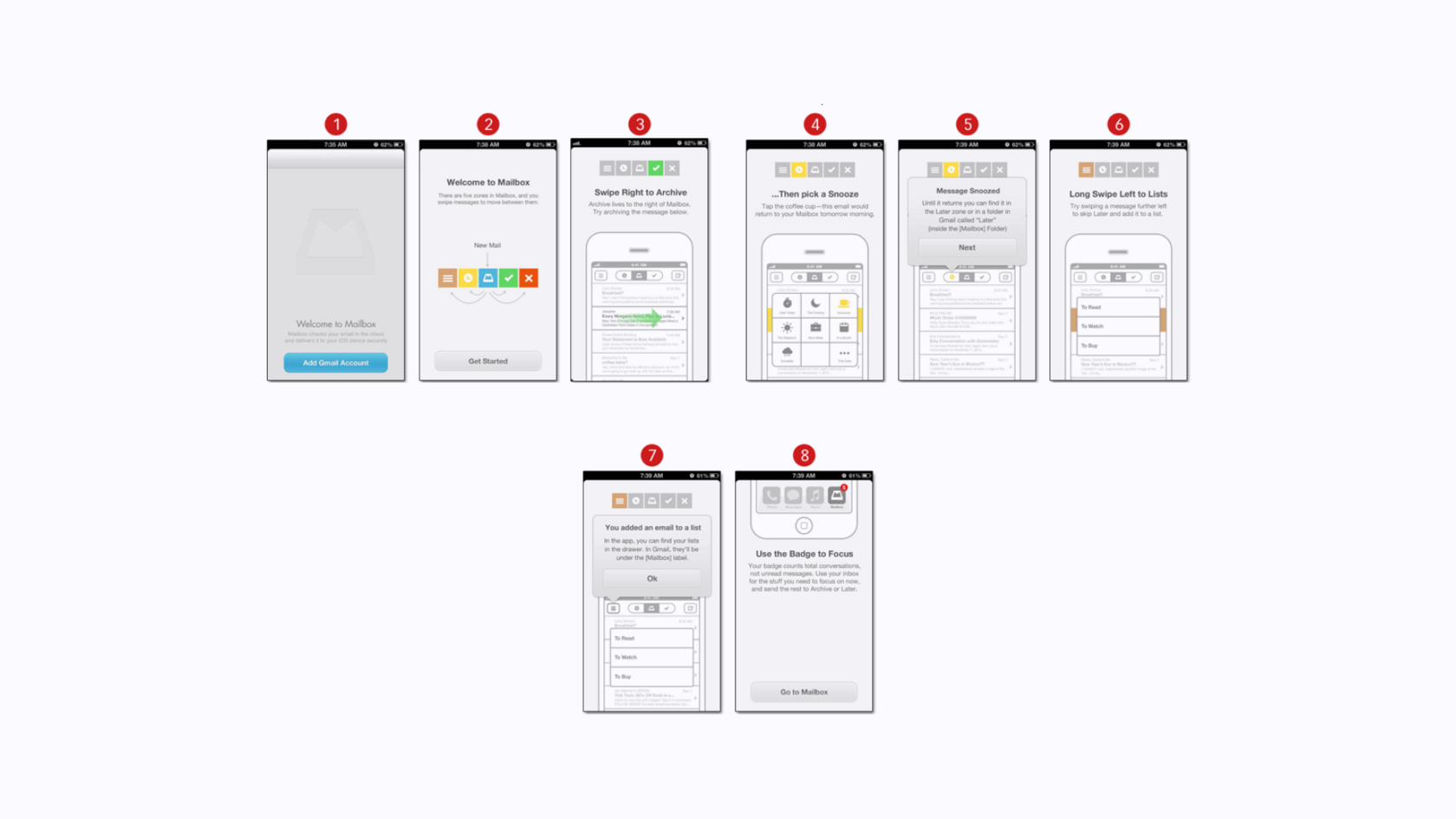
At this stage, your job is to show them how to get started, not to cover everything in 20 steps.
Besides written instructions, you can guide users through:
- Interactive tutorials
- Instructional screens
- Progress bars or status indicators
- Visual hints
- Step-by-step breakdowns
- Tooltips or pop-ups
- Video walkthroughs
The goal is to give new users just enough structure so they don’t feel lost, but also leave room for exploration, which increases engagement.
5. Streamline sign-up
Sign-up and registration are essential parts of onboarding. And of course, they shouldn’t be barriers. The process should be short, clear, and appear at the right time.
An overly complicated or poorly timed sign-up screen can destroy engagement. Your form should ask for the minimum info necessary and be hard to ignore.
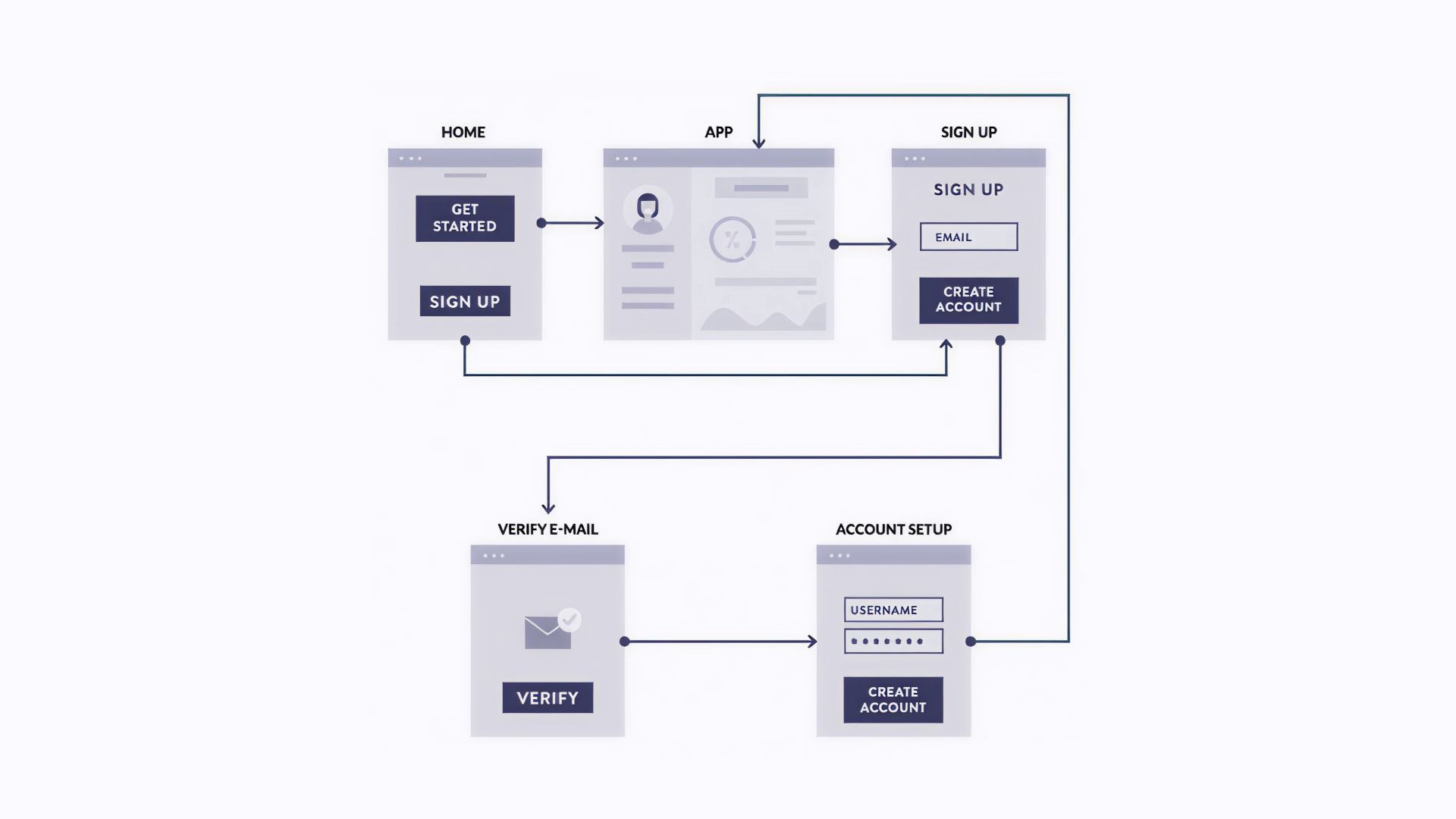
According to ConversionXL, there are three main sign-up approaches:
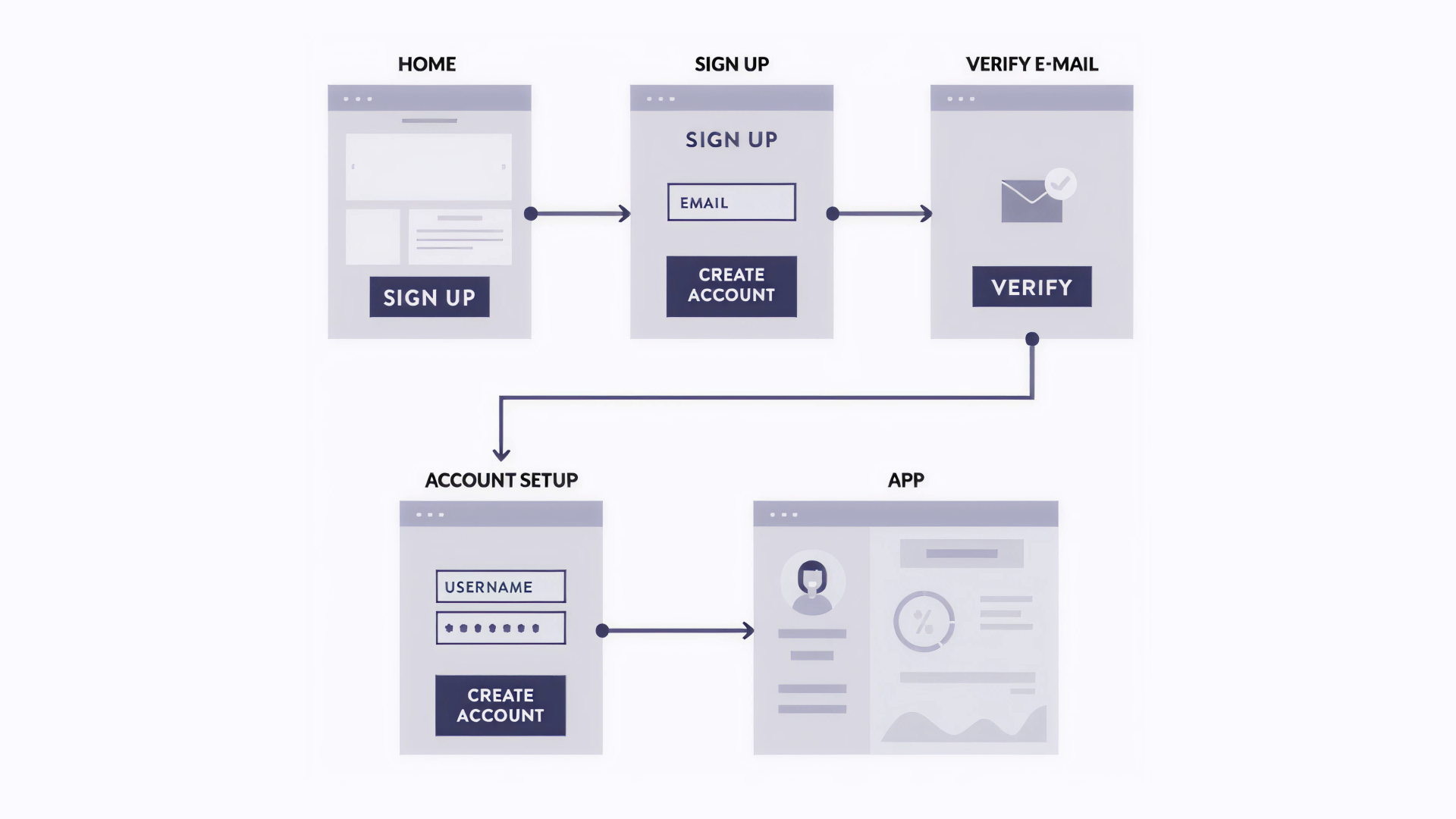
1. Full registration before access
Users create an account, confirm via email, and only then access the app. This is the most common method, but risky for new or unknown apps, since users don’t yet trust you.
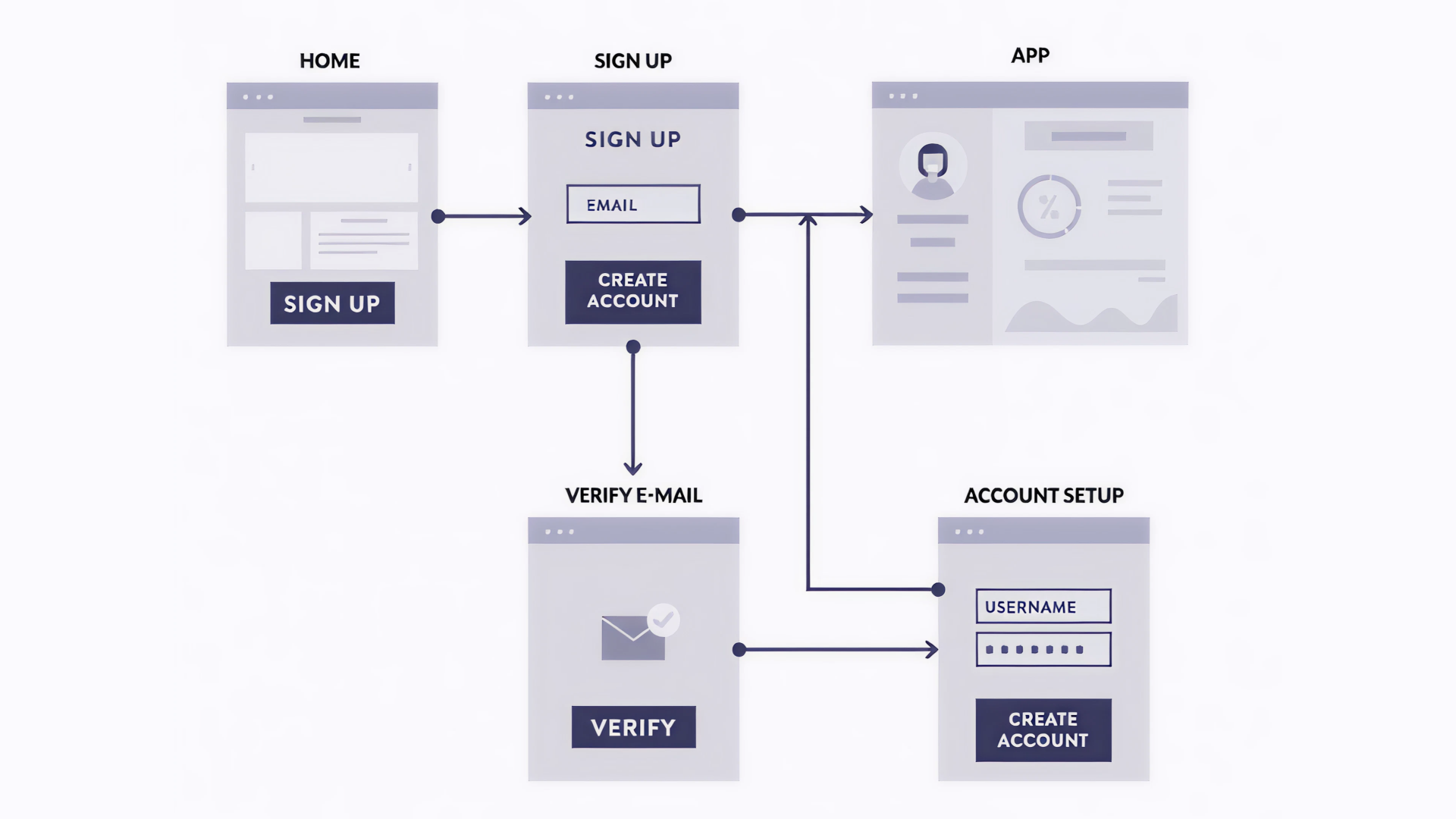
2. Quick registration
Users only provide an email to gain instant access and complete the sign-up later. This conversion-friendly approach works well when the app already has some reputation.
3. Instant access without sign-up
This is the best option. Full access is granted even before registration. News apps often use this approach, letting users see the app first and subscribe later only if they like it.
The Pacer Pedometer is a great example: it lets users explore the app without constant registration prompts. They can take a guided tour, get to know the app, and only sign up when they’re ready.
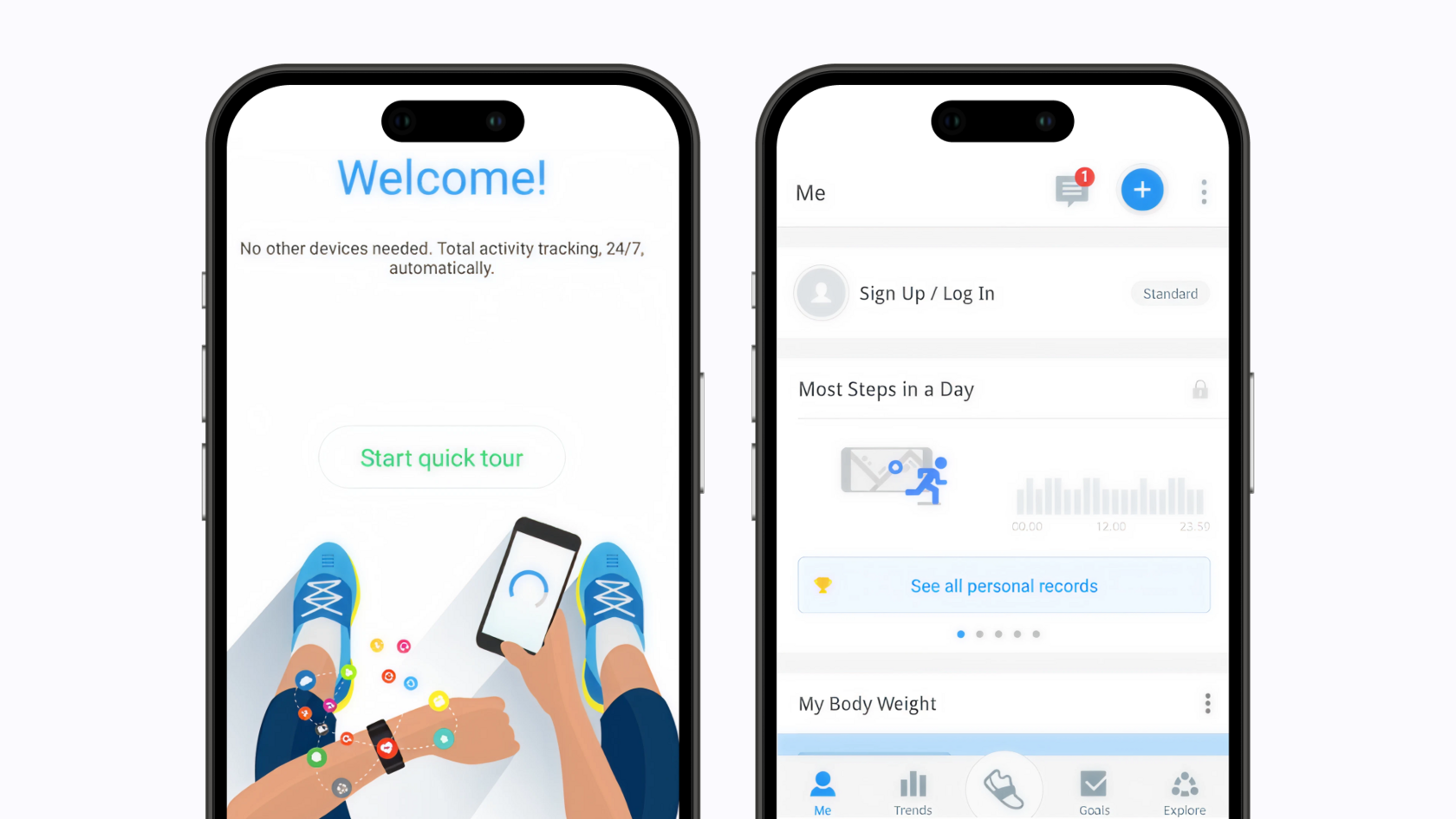
Want to increase sign-ups? Add a reminder to register at the end of onboarding, when users already see the value.
And remember: long forms are a bad idea. Short forms win. Stats show that simpler forms = higher engagement. Ask only for what’s truly essential.
6. Push notifications
Smart, personalized push notifications work like a friendly tap on the shoulder. When timed right, they can be that perfect reminder that brings users back — we're talking up to 88% more engagement. But here's a pro tip: make them feel helpful, not spammy.
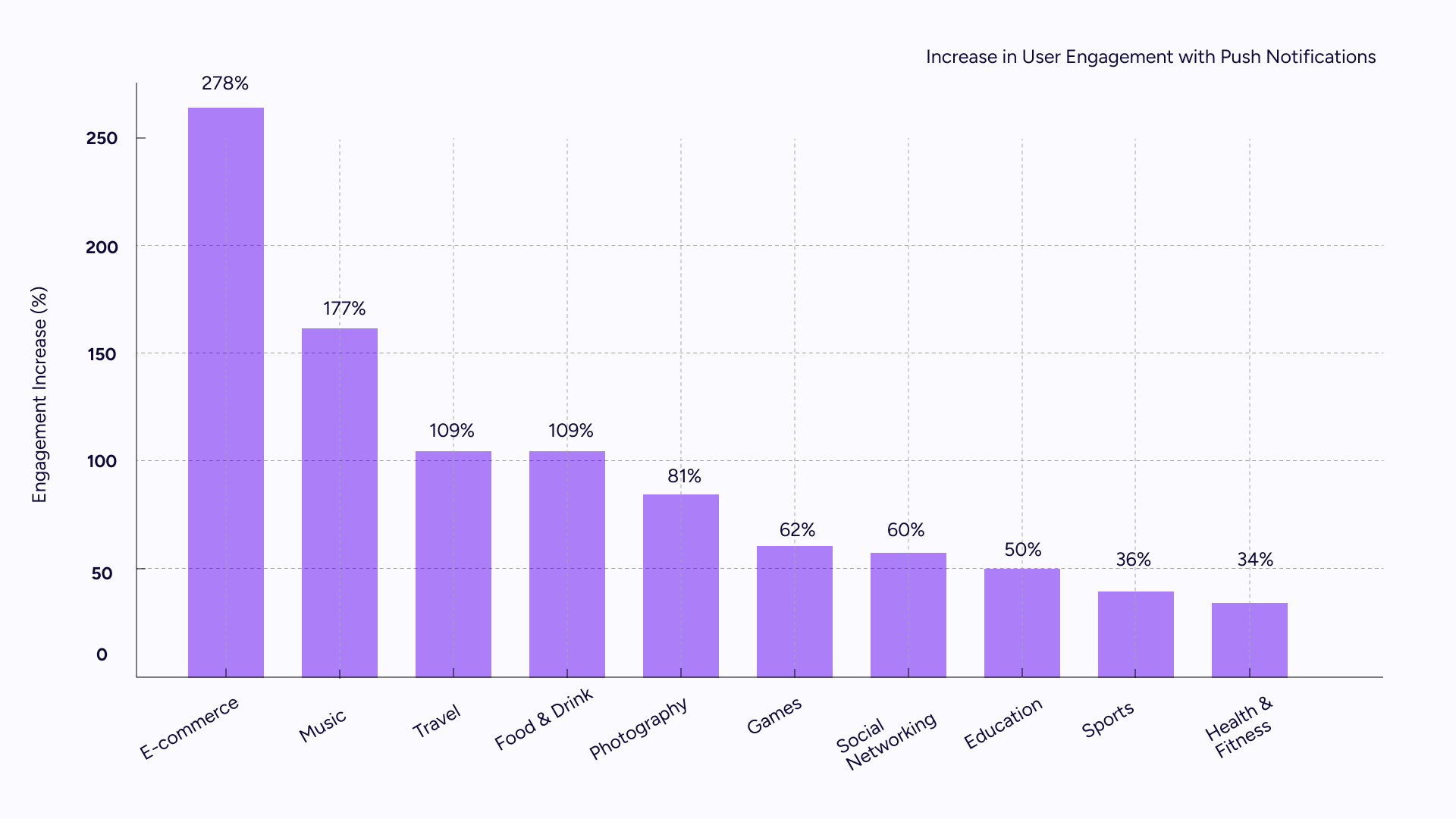
Our data shows that 65% of users retain the app for 30 days after receiving push notifications, and, overall, push notifications can increase retention rates tenfold.
Notifications serve multiple purposes: reminders, update alerts, or immediate calls to action. For example, if a user hasn’t used the app since subscription, send a push with a cool unused feature prompt.
7. Email sequences
On-screen instructions alone aren’t enough follow-up email campaigns are essential to engage, educate, and remind users in their first days with the app. Email onboarding is still a key part of the onboarding strategy.
According to AAA, sending emails to app users during their first week after install can increase two-month retention by 130%.
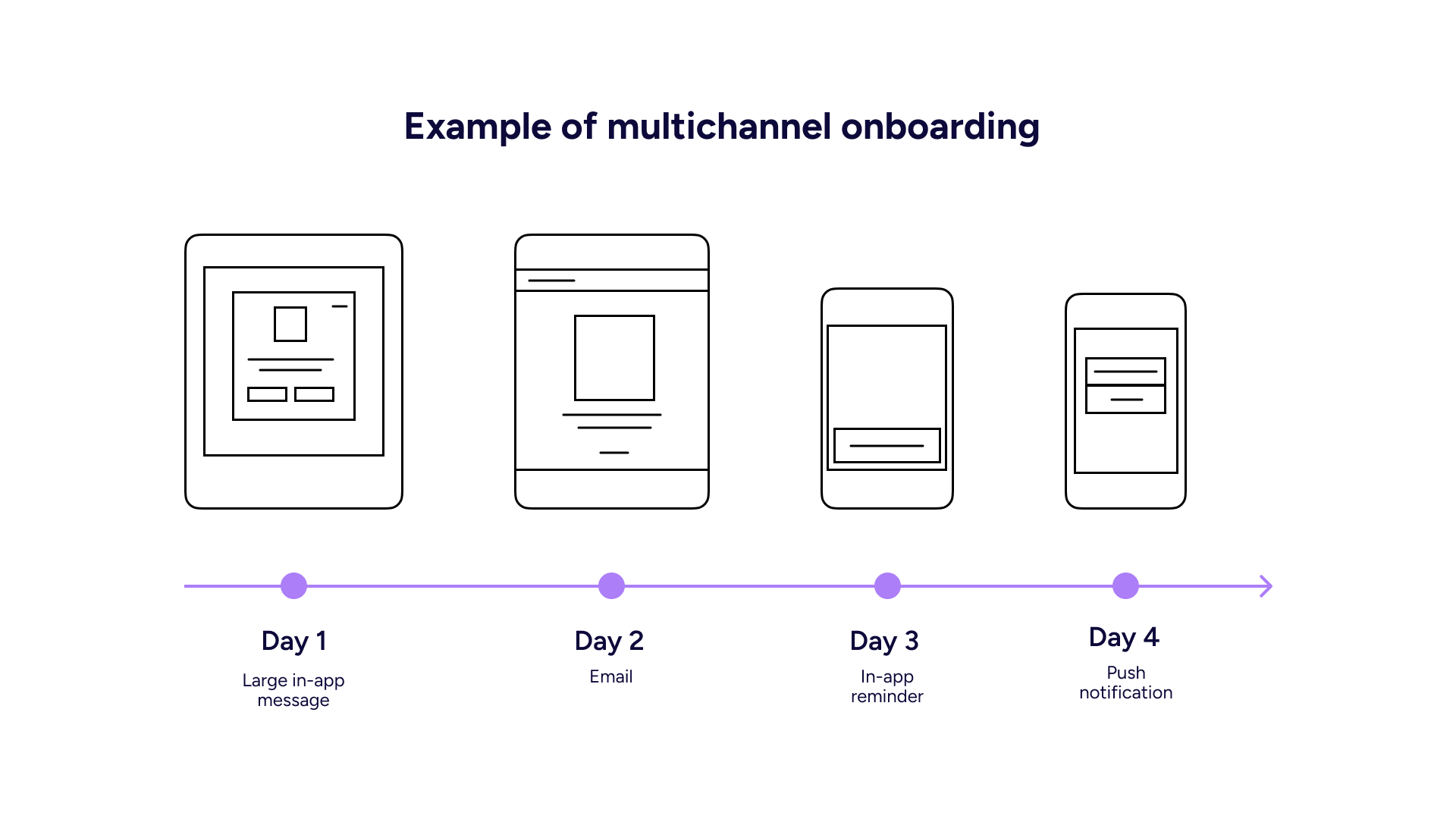
When new users face challenges early on, it’s important to remind them about the app. Zapier, for example, sends follow-up emails if they detect that users are struggling at the start.
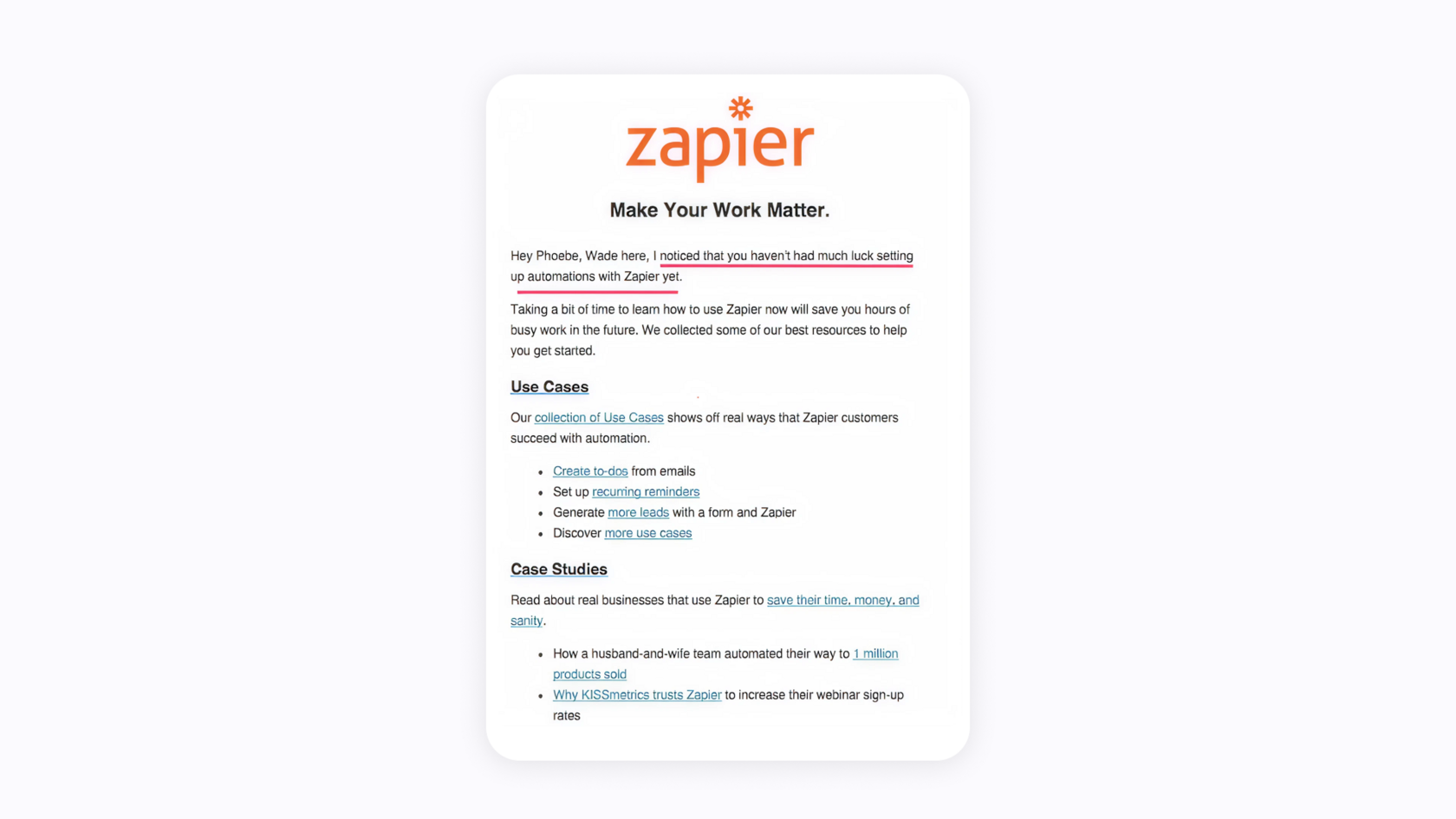
Personalized, targeted emails like these definitely bring users back. Email sequences sent to new clients help them reach their first successes faster. Leaving users on their own leads to churn.
Onboarding isn’t everything, but it’s where everything starts
Even a great app can lose users if the mobile app user onboarding experience doesn’t land. But when done right, onboarding gives people a reason to stay, not just try.
It does three things really well:
- Helps people figure out your app quickly
- Shows them why it's useful right away
- Gets them using it regularly
You're basically making everything as smooth as possible to get them started, while setting things up so they'll keep coming back.
None of this happens by accident. From your welcome screen to your sign-up flow to your first email — it all needs to work together during those early days when users are still deciding if your app stays or goes.
That’s when users need your support the most.
That’s when your product either becomes a habit or gets forgotten. Sad but true.
Need help building an onboarding experience that actually works for your exact app?
Let’s talk. Leave us a message.

Christina Zhukova
Christina is a mobile marketing strategist at LoveMobile, specializing in ASO, UA, and growth strategies for mobile apps. She helps apps optimize campaigns, improve organic traffic, and boost ROI.
newsletter